Wednesday, May 22, 2019


Tuesday, May 21, 2019
How to Use Torrents

How to Use Torrents: Step-By-Step Guide
In essence, you can learn how to use torrents by first knowing what they can do. So, we will teach you how to download torrents, identify the ‘healthiest’ ones, and how to take part in the global file sharing community. Keep on reading.
Step 1: Install a Torrent Client
Before you can download torrents, you need to install an application that is capable of downloading torrents. No matter if you use Windows, Mac, or Linux – you won’t find this option enabled by default. Instead, downloading a reliable torrent client means that your operating system will begin to recognize torrent files as valid files that can be opened and downloaded.

The first step is to download and install an application that handles torrents
Step 2: Find a Torrent Tracker Site
No matter if you want to download a large application, movie, or music – you first need to have a torrent file at your disposal. This is where torrent tracker sites come into play. What you need to understand is that these websites don’t host any content. Instead, they serve as repositories of torrent files that point to data on other people’s computers. There are two types of torrent tracker sites:
- Public trackers are easily accessible and available to everyone. You can do a quick Google search and you will see dozens of different options. However, this doesn't mean that you should go for the first option you see. Instead, you need to make sure that a website isn't malicious.
- Some of The Most Popular Torrent Sites:
- YTS.AM
- 1337X
- THE PIRATE BAY
- RARBG

Step 3: Download the Torrent File
Once you've found a website that contains torrents, you need to know how to pick the one that’s good for downloading. Not all torrent files are created equal and there’s a certain mechanism involved. This is where you need to be acquainted with two terms: seeders and leechers.
- Seeders are people who have downloaded 100% of data that comes with torrents. In other words, their machines start to seed the data, so other people can access and download parts of it.
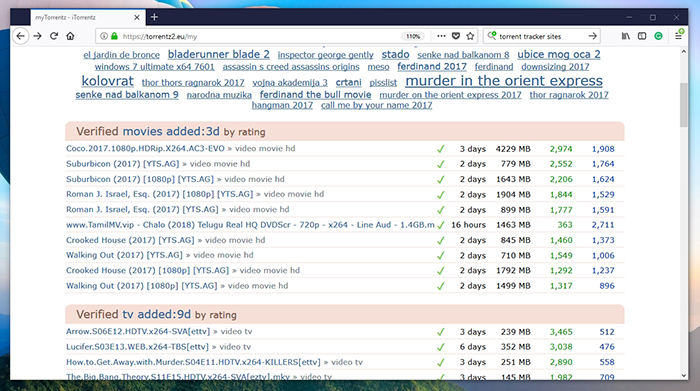
- Leechers are people who are in the process of downloading torrents. Their torrent clients take bits of data from other computers and copy it to your computer. Once you finish downloading a torrent, you automatically become a seeder.
Why is this important to know? Well, you can imagine what happens if only one user has a file that is fully available, while ten other users are downloading it. Your download speed will be very limited. In case 50 users have the downloaded files, and 10 are downloading them (leeching) – your torrent client will be able to achieve a much greater download speed.
Step 4: Open the Torrent File
Once you've found a file you’d like to download, first download the torrent file to your computer. Then, double-click to open it in a previously downloaded torrent client. This is pretty much where your involvement ends. The client will download the data on its own by connecting to a large number of seeders. It might take a few minutes until the file starts downloading at a faster speed, so be patient and wait.
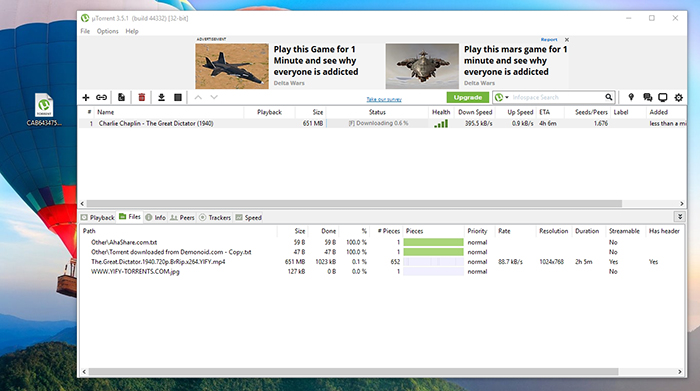
It is also worth mentioning that you can download multiple torrents at the same time. However, their combined download speed can’t be greater than your Internet connection’s maximum download speed.
Step 5: Seeding the Torrent File
Once you've fully downloaded the torrent, you can keep it open in the torrent client. This would mean that you’ll become a seeder – helping other users to download the file without any problems. It is up to you if you’d like to be a seeder for a few hours, or even a few days or weeks.
Disclaimer : InsaneMonk does not approve any kind of illegal or copyright related things.Even though P2P file sharing technology is legal, many of the files exchanged via P2P are indeed copyrighted.We just hope that you now know the basics of how to use torrents.
Subscribe to:
Comments (Atom)
-
 In all times and places in history human beings have wondered where did we come from ? what's our place in the world? what happe...